

TL;DR:
- An exhibit stamp is a standardized label used to identify documents or items as exhibits in legal, administrative, or collecting contexts. It can be a physical rubber stamp or a digital PDF stamp, both serving to organize, reference, and verify items efficiently. Proper use includes customizing with required metadata, flattening digital stamps, and positioning stamps consistently to ensure clarity and compliance.
An exhibit stamp is a standardised label applied to documents or items to identify them as formal exhibits in legal, administrative, or collecting contexts. You will find them on court evidence files, wills, audit records, and museum displays alike. Physical versions are typically self-inking rubber stamps sized approximately half an inch by one and a half inches, while digital versions are applied directly to PDF files. Both formats serve the same core purpose: organisation, identification, and reliable reference.
What is an exhibit stamp and what types exist?
An exhibit stamp is defined as any mark, label, or annotation that formally designates a document or item as an exhibit for identification and reference. The industry uses two primary formats: physical rubber stamps and digital PDF stamps. Each suits different workflows, but both carry the same essential information.

Physical self-inking rubber stamps
Physical exhibit stamps are the traditional format. They are compact, typically around half an inch by one and a half inches, and self-inking rubber stamps reload automatically after each impression. Practitioners use them on paper documents such as wills, case files, and audit records where clear, consistent identification is required. Physical stickers are often produced in bright colours, including yellow, blue, and red, for quick visual identification in busy filing environments.
Digital exhibit stamps for PDF workflows
Digital exhibit stamps are applied using PDF editing software such as Adobe Acrobat, using the “Add Stamp” or “Custom Stamp” tools. The process takes approximately one to two minutes once a template is set, and dynamic numbering allows automatic sequencing across multiple documents. Digital stamps are highly customisable, with options for colour, format, and embedded metadata, which makes them well suited to remote collaboration. They also support paperless workflows by improving searchability and ensuring consistent reference across all parties in a proceeding.
The table below compares the two formats at a glance.
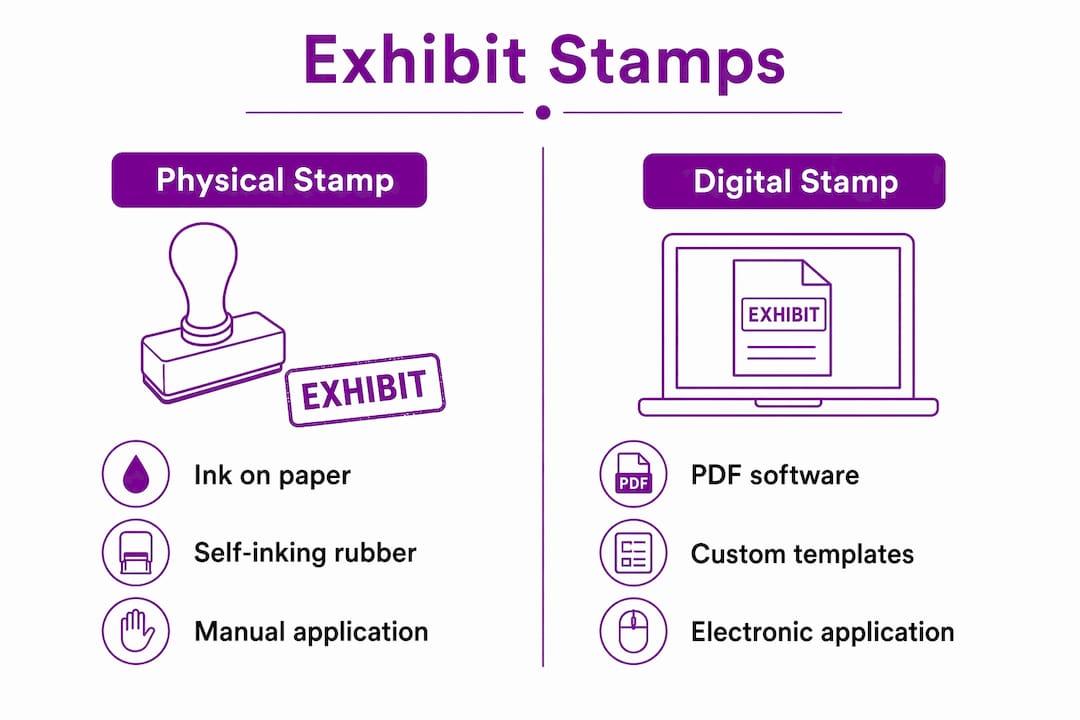
| Feature | Physical stamp | Digital stamp |
|---|---|---|
| Application method | Ink on paper | PDF editing software |
| Typical size | Approx. half inch by one and a half inches | Variable, set in software |
| Colour options | Fixed ink colour | Fully customisable |
| Dynamic numbering | Manual | Automatic |
| Alteration risk | Low once applied | Requires flattening to secure |
| Best use case | Paper documents, court files | Electronic filings, remote work |
Pro Tip: If you handle both paper and digital documents, create matching templates for each format. Consistent layout across physical and digital stamps reduces the chance of misfiling.
How are exhibit stamps used in legal and administrative settings?
Exhibit stamps serve a precise function in legal proceedings: they mark and track evidence or documents so that every party, judge, and clerk can locate and reference the same item without ambiguity. This function directly supports the chain of custody, which is the documented sequence of who handled a piece of evidence and when. A missing or unclear stamp can break that chain and put the admissibility of evidence at risk.
Courts often regulate the metadata fields that must appear on an exhibit stamp. Common required fields include:
- Case number — links the document to the specific legal matter.
- Party designation — identifies whether the exhibit belongs to the claimant, defendant, or another party.
- Exhibit reference number — provides a unique identifier for cross-referencing in transcripts.
- Date of submission — records when the document entered the proceedings.
- Court or jurisdiction name — confirms the venue for which the exhibit is prepared.
Improper stamping, such as omitting a required field, can cause e-filing rejections in courts that use electronic case management systems. That outcome delays proceedings and creates additional administrative work for legal teams. Checking the specific court’s filing rules before finalising any stamp design is therefore not optional; it is a basic requirement.
The digital stamping process in Adobe Acrobat follows a clear sequence: open the document, select the stamp tool, choose or upload a custom template, position the stamp, and save. The critical final step is to flatten the PDF. Flattening the stamp merges the annotation layer with the document layer, preventing anyone from removing or editing the stamp after submission. Novices frequently skip this step, leaving stamps as editable annotations that opposing parties or clerks could accidentally delete.
Pro Tip: Always save a flattened copy as a separate file. Keep the unflattened original in your working folder so you can correct errors before re-flattening and resubmitting.
Exhibit stamps also appear in administrative contexts well beyond courtrooms. Auditors apply them to financial records, solicitors use them on conveyancing files, and regulatory bodies attach them to inspection reports. In each case, the stamp signals that the document has been formally received and assigned a reference within a structured system.
What role do exhibit stamps play in collecting and exhibitions?
Outside legal settings, exhibit stamps function as formal identifiers for items on display or in a collection. The philatelic world, which is the world of stamp collecting, relies on exhibit labels to organise and present collections at competitive shows. Museums use similar labels to identify artefacts and communicate context to visitors.
Key functions of exhibit stamps in collecting and exhibition contexts include:
- Identification. Each item receives a unique reference that links it to a catalogue or display plan.
- Narrative context. Labels communicate the significance of an item without requiring a separate explanation from staff or judges.
- Organisational consistency. Uniform labelling across a collection signals professionalism and aids judging panels in comparative assessment.
- Provenance tracking. Labels record where an item came from and how it entered the collection.
The American Philatelic Society publishes judging guidelines that require a clear concept communicated through the exhibit’s title page narrative. This standard reflects a broader principle: an exhibit stamp or label is a communicative tool that delivers immediate context to viewers without additional explanation. That principle applies equally in a courtroom and a philatelic competition hall.
The differences between legal and collecting exhibit stamps are mainly ones of content rather than purpose. Legal stamps carry case numbers and party designations. Collecting labels carry catalogue references and provenance notes. Both formats share the goal of making an item instantly identifiable and traceable within its system.
What best practices should you follow when using exhibit stamps?
The most common mistake with exhibit stamps is using a generic label when a specific one is needed. Customising exhibit stamps for each case, party, or collection reduces the risk of confusion significantly. Including fields for party designation, case number, and date improves clarity and helps avoid document rejection by courts or exhibition organisers.
Practical best practices include:
- Choose colour carefully. Physical stickers in bright colours aid quick visual sorting, but digital stamps should use transparency to avoid obscuring document text, in line with court standards.
- Position stamps consistently. Place stamps in the same corner of every document so clerks and judges can locate them without searching.
- Flatten digital stamps. Merge the stamp layer with the document before submission to prevent unauthorised alteration.
- Verify metadata requirements. Check the specific court’s or organisation’s rules for required fields before printing or applying any stamp.
- Build reusable templates. Creating a library of approved templates for recurring case types or collection categories saves time and reduces errors.
For organisations handling large volumes of documents, a digital versus traditional stamping review is worth conducting periodically. Workflows change, and a stamp format that suited a paper-heavy office may not serve a team that now files electronically.
Pro Tip: Test your digital stamp template on a non-critical document before applying it to live case files. Check that all metadata fields display correctly and that the flattened file opens without errors on a second device.
Key takeaways
An exhibit stamp is the primary tool for identifying, organising, and protecting documents or items in legal, administrative, and collecting settings.
| Point | Details |
|---|---|
| Core definition | An exhibit stamp formally designates a document or item as an exhibit for identification and reference. |
| Two main formats | Physical self-inking rubber stamps suit paper files; digital PDF stamps suit electronic workflows. |
| Legal requirements | Courts regulate required metadata fields; missing fields cause e-filing rejections. |
| Flattening is critical | Digital stamps must be flattened into the PDF to prevent removal or alteration. |
| Customisation reduces errors | Party-specific and metadata-rich stamps outperform generic labels in complex cases. |
From physical ink to digital layer: what I have learned about exhibit stamps
The shift from physical rubber stamps to digital PDF annotations has been the single biggest change I have observed in how legal and administrative teams handle exhibits. Physical stamps are tactile and immediate. You press, you mark, you file. Digital stamps require more steps and more discipline, particularly around flattening. The number of times I have seen a legal team submit a PDF with an editable annotation layer, believing the stamp was secured, is genuinely surprising.
What strikes me most is that the underlying principle has not changed at all. Whether you are pressing ink onto a will or applying a custom stamp in Adobe Acrobat, the goal is the same: make this item unambiguously identifiable to anyone who encounters it. The format is secondary. The discipline around metadata, positioning, and securing the stamp is what actually matters.
The collecting world gets this instinctively. Philatelists and museum curators treat labelling as part of the exhibit itself, not an afterthought. Legal teams would benefit from adopting the same mindset. A well-designed exhibit stamp, whether physical or digital, is not administrative overhead. It is the foundation of a credible, organised presentation.
For organisations still using generic stock labels, the upgrade to customised stamps with embedded metadata fields is straightforward and the return in clarity and reduced rejection rates is immediate. Stampdesign4u offers personalised stamp options that cover both physical and professional use cases, which is a practical starting point for any team reviewing its exhibit stamping process.
— Steven
Stampdesign4u and your exhibit stamp requirements
Selecting the right exhibit stamp for professional use does not need to be complicated. Stampdesign4u produces custom self-inking rubber stamps designed for legal, administrative, and collecting applications, with options to include all required metadata fields in a clear, consistent layout.
The Trodat 4927 self-inking stamp is a practical choice for organisations that need a reliable physical exhibit stamp with multiple lines of text. For teams that need a broader selection, Stampdesign4u’s stock stamps collection includes ready-made options suitable for document labelling and exhibit marking. Custom designs are also available for organisations with specific jurisdictional or branding requirements. Contact Stampdesign4u directly to discuss the right format for your workflow.
FAQ
What is the exhibit stamp definition in legal terms?
An exhibit stamp is a standardised label applied to a document or item to formally identify it as an exhibit in legal proceedings, carrying fields such as case number, party designation, and submission date.
How do you use exhibit stamps on PDF documents?
Apply a custom stamp using PDF editing software such as Adobe Acrobat, then flatten the document to merge the stamp permanently into the file and prevent alteration.
What are the main types of exhibit stamps?
The two main types are physical self-inking rubber stamps, used on paper documents, and digital PDF stamps, applied via editing software for electronic filings.
Why must digital exhibit stamps be flattened?
Flattening merges the stamp annotation with the document layer, preventing the stamp from being removed or edited after submission, which is a requirement in most court e-filing systems.
Where can you find exhibit stamps for professional use?
Physical exhibit stamps are available from specialist stamp producers such as Stampdesign4u, which offers custom self-inking options with configurable text fields suited to legal and administrative use.